Web Services: API
The Dialogue Branch Web Service source code is part of this monorepo, in the apps/api folder. It is a pure OAuth2 resource server — user authentication itself is handled entirely by Keycloak, see Authentication — that wraps the Dialogue Branch Core library with a REST API.
The Gradle wrapper (./gradlew) in apps/api is used to build the service, which is packaged as a WAR file for deployment on Tomcat 10, or built as a Docker image using the provided Dockerfile (built from the repository root, since the Docker build context spans both apps/api/ and packages/core/). A detailed installation tutorial is provided here: Dialogue Branch Web Service - Installation.
Authoring API
Beyond executing published dialogues, the Web Service also hosts the API used by the visual dialogue editor in Dialogue Branch Studio:
- Projects (
/project/*) — create, update, delete Dialogue Branch Projects and manage their translation languages.POST /project/delete-project(projectSlug, and optionallydeleteVariables,deleteLogs) deletes a project's dialogues (draft and published), translations and version history. Its users' variables, variable history and dialogue logs are kept unlessdeleteVariablesanddeleteLogsask otherwise: the project then stays as a deleted project, no longer found or listed, under the slug<slug>__deleted(or<slug>__deleted-2, …), and its logs move along, so the original slug is free for a new project that can't inherit any of that data. With both options it is removed for good.GET /project/list-deleted-projectslists the deleted projects (slug, name, deletion time, and how many users have variables and how many dialogue logs they still have), andPOST /project/purge-deleted-project(projectSlug, the deleted project's slug) removes one for good, with all its users' variables, variable history and dialogue logs; both need the permission to delete projects.POST /project/discard-draft-changes(projectSlug) discards all of a project's draft changes: its draft display name and description, its translation languages and every dialogue become identical to its latest published version again, and dialogues that were never published are removed. It needs the permission to publish, and refuses a project that was never published (400). - Authoring (
/authoring/*) — CRUD operations on a project's editable draft dialogues, nodes and translations. Draft content is kept separate from published content, so authors can make in-progress changes without affecting what's currently live.POST /authoring/import-scriptsimports.dlbfiles (multipart:projectSlug,folder,files,replace) into a folder as draft dialogues: each file becomes the dialogue named after the folder and its file name without.dlb. It is all or nothing: a file that isn't a UTF-8.dlbfile of at most 1 MB, doesn't make a valid dialogue name, can't be stored as draft nodes (a node without---or atitle, an invalid header, a duplicate node title), or would overwrite an existing dialogue withoutreplace=truerefuses the whole import, with the problems listed per file. Syntax errors in node bodies don't refuse a file; they are returned per file.GET /authoring/export-dialogue(projectSlug,dialogueName) is its counterpart: it downloads one dialogue's current draft content (not the published version) as a UTF-8.dlbfile, named after the dialogue's last name segment, which imports again unchanged under the same name. Its translations are not part of the file.POST /authoring/update-translationchecks a translation before storing it: the content must be a JSON object of speaker groups (_userfor the user's replies), each mapping source texts to their translations, that the translation parser reads without errors. An entry outside a speaker group is refused, since a translation only applies to its own speaker. Anything else is refused with the problems listed, and nothing is stored. Valid content is stored re-serialised, in its own structure and order, without empty translations.POST /authoring/import-translationsimports translation files (multipart:projectSlug,language,folder,files,replace) into one translation language: each file becomes the translation of the existing draft dialogue named after the folder and its file name without.json. It is all or nothing: a file that isn't a valid translation file (the same check asupdate-translation), contains no translations, is larger than 1 MB, has no such dialogue (or one pending deletion), or would overwrite an existing translation withoutreplace=truerefuses the whole import, with the problems listed per file. Each imported file is stored re-serialised, and the result reports per fileunmatchedEntries(entries that match no translatable term of the dialogue on speaker and text, kept anyway) anduntranslatedTerms, bothnullwhen the dialogue's draft doesn't parse.POST /authoring/discard-dialogue-changes(projectSlug,dialogueName) discards a draft dialogue's changes: its nodes (with their headers and positions), preamble and translations become identical to its latest published version again, it gets its published name back if it was renamed, and it is no longer marked as changed. It is refused for a dialogue that was never published (400) or is pending deletion (409), when another dialogue has taken its published name (409), or when a translation language was renamed since it was published (400, since that translation couldn't be restored). Translations in a language the published version has none in are removed.GET /authoring/list-dialogueslists, per dialogue, the codes of the project's translation languages it already has a translation in (translatedInto). - Publishing (
/publish/*) — validate and publish a project's current draft content as a new, immutable published version, available to the execution engine. - Test sessions (
/test-session/*) — lets an author test-run a dialogue against its unpublished draft content, separate from the normal/dialogue/*execution path against published content. A test session never reads or writes the user's real variables: it runs against the tester's own copy of them, kept in memory and seeded from the stored variables when first needed. The copy is never saved, recorded in the variable history or sent to the External Variable Service. All of a tester's test sessions in a project share one copy.POST /test-session/start(projectSlug,dialogueName,language,timeZone, optionalstartNodeId,contentanddelegateUser) starts a session and returns itstestSessionId. Withcontent=published, the session runs the dialogue's latest published version instead of its draft (404for a project that was never published), for example to simulate a user on what they would really see. The session id is used byPOST /test-session/progressandPOST /test-session/cancel. The copy itself is addressed by project:GET /test-session/variables,POST /test-session/set-variable(name, andvalue, or none to remove it) andPOST /test-session/reset, which makes it identical to the stored variables again. WithdelegateUser(admins only), the copy starts from that user's stored variables, which are only read; an unknown user answers404with codeUNKNOWN_USER. All of these need theDIALOGUE_TESTpermission (theeditorrole). A session handles one request at a time. It ends when its dialogue does (atEnd, or at a node without replies), after which itstestSessionIdanswers404, as it does for a session that was cancelled or idle for longer thandlb.test-session.idle-timeout-minutes(default 30, environment variableDLB_TEST_SESSION_IDLE_TIMEOUT_MINUTES). A copy that no session uses is removed after the same idle time, so its next use seeds it again from the stored variables.
After having successfully deployed the web service, you can start exploring its functionalities through the provided Swagger pages (see image below).
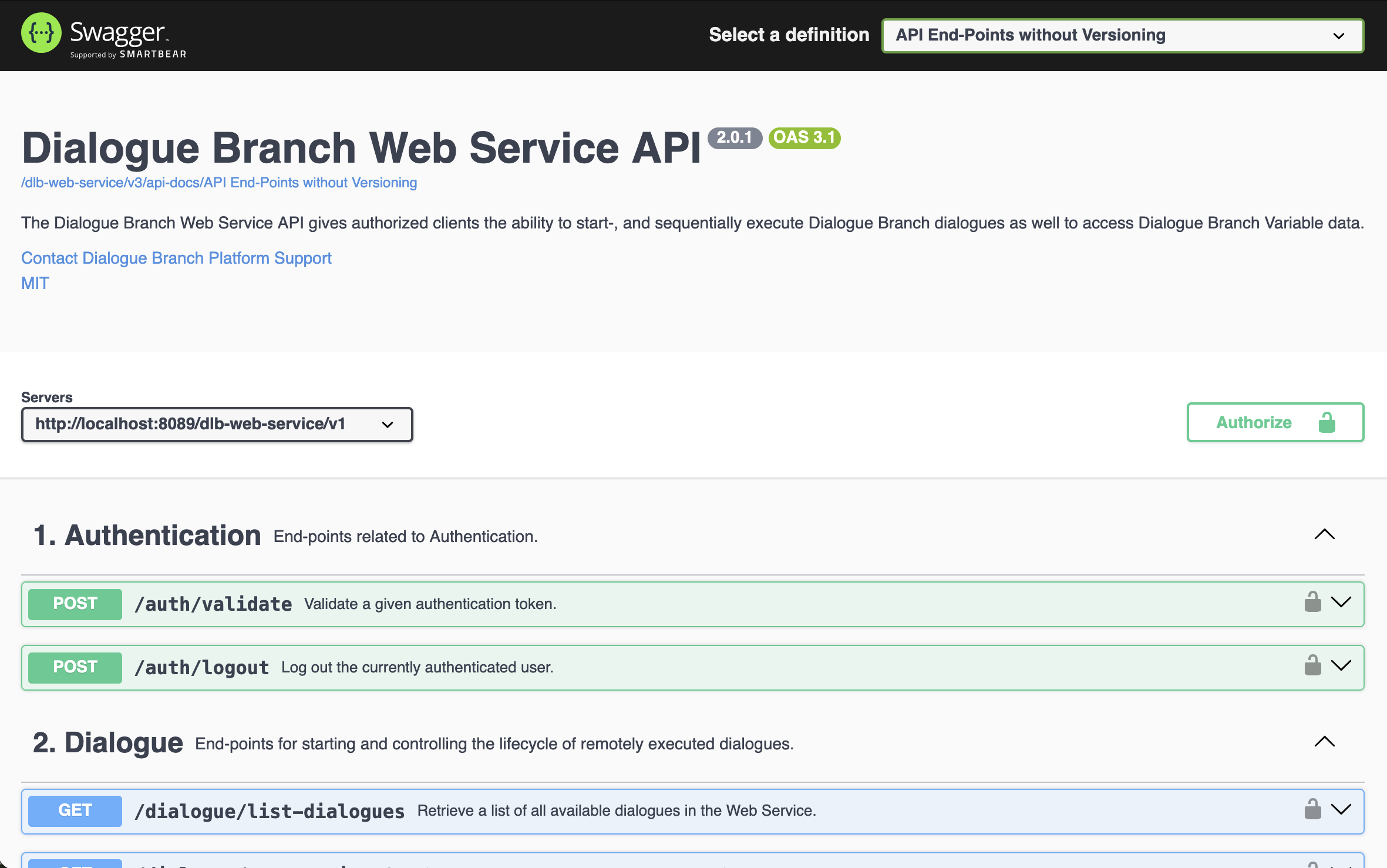
Screenshot of the provided Swagger pages for the Dialogue Branch Web Service.
Dialogue Execution
The Web Service offers a /dialogue/* family of end-points for starting and progressing dialogues: /dialogue/start, /dialogue/progress, resuming an interrupted session (/dialogue/continue, /dialogue/get-ongoing), reverting to a previous step (/dialogue/back), explicitly ending a session (/dialogue/cancel), and (for users with the editor or admin role) listing all dialogues available in a project (/dialogue/list-dialogues). See the Swagger UI for the full set of parameters for each end-point.
Script Author Tip: Re-execution of <<set>> commands
Both /dialogue/continue and /dialogue/back re-execute the target node against the user's live Variable Store, including any <<set>> commands in the node's body. For idempotent assignments (such as <<set $status = "active">>), this simply rewrites the same value. However, non-idempotent operations (such as counters like <<set $visits = $visits + 1>>) will run again on every resume or step back.
To avoid unwanted re-executions, place non-idempotent variable assignments on reply options (e.g. [[Reply|TargetNode|<<set $visits = $visits + 1>>]]) rather than in node bodies. Reply statements only execute when that specific option is chosen by the user.
/dialogue/start takes an optional language, one of the project's source or translation language codes. Leave it out (or empty) to start the dialogue in the project's source language. Codes are matched exactly (nl does not match a project's nl-NL). A code the project doesn't have is not an error: the dialogue runs in the project's source language instead, so a client whose language setting doesn't exactly match still gets a dialogue, and the Web Service logs a warning about the mismatch. The same applies to a translation language the project declares but hasn't translated a given dialogue into yet (without the warning). The language actually used is recorded in the dialogue log (/log/get-session).
For a concrete, step-by-step example of calling these end-points from your own client application, see 3rd Party Client Applications.
Working with Variables
Variables are used in .dlb scripts to create dynamic dialogue flow, and include flavourful personalisations. These Variables can be set and used inside the dialogue scripts themselves, as in the example below:
<<set $playerName = "Bob">>

Hello $playerName, how are you doing?

[[I'm fine.|PlayerIsFine]]
[[I'm sad.|PlayerIsSad]]
However, as in the example, it doesn't always make sense to set the values for Variables in the dialogue scripts themselves. Instead, these values might originate from another part of your client application. Imagine that your client application is a game that includes a user interface where players can insert their name. When a player does this, the value should be communicated to Dialogue Branch, so that the $playerName variable may be used in dialogues.
The Web Service offers the following end-points for sending Variable-values to the service:
/variables/set-single— allowing you to set the value for a single Variable by providing anameand avalue./variables/set— allowing you to set the value for a number of Variables simultaneously by including a JSON payload in the body.
Using these, you can inform Dialogue Branch about Variables whose values are generated through any part of your client application. The other way around, your client application can also ask the Web Service about Variable values, using the following end-point:
/variables/get— allows you to ask for all known Variables for a user, or a space-separated list of specific Variables (via thevariableNamesparameter).
Variables are scoped to the project: the same variable name in two different projects holds two independent values. All of the end-points above therefore take a required projectSlug parameter identifying which project's variables to read or write.
Variable history
/variables/get only returns a Variable's current value. The Web Service also keeps a history of every value a Variable has had, which you can read with:
/variables/history— returns a user's recorded Variable changes within a project (projectSlug, required), newest first and paginated (page, zero-based, andpageSize, default 50, at most 200). PassvariableNameto get the history of a single Variable; leave it out to get the history of all of them, interleaved.
To ask for a period of time, such as every value a Variable had in the last month, pass from and/or to, both epoch milliseconds (the same unit as an entry's recordedTime). Only entries recorded in the range [from, to) are returned: from is inclusive and to is exclusive, so consecutive ranges never overlap or leave gaps. Either one can be left out (everything up to to, or everything from from on). They combine with variableName, and with page / pageSize, which page through what remains, still newest first. A from after to, or a value that is not a whole number, answers 400; from equal to to is simply an empty range.
Each entry has an id (unique, and increasing in the order entries were recorded — useful to recognise an entry you've already seen when new entries shift the pages while you're paging), the Variable's name, the value it was given, the recordedTime (epoch milliseconds) and recordedTimeZone (IANA name) at which the Web Service recorded the change, and the source of the change: DLB_SCRIPT (a <<set>> in a dialogue), INPUT_REPLY (a value entered in a reply's input field), WEB_SERVICE (one of the /variables/set* end-points), or EXTERNAL (an External Variable Service update).
A few things to keep in mind when reading the history:
- Every change is recorded, including repeats. Setting a Variable to the value it already has produces a new entry. A series like
fine,fine,bad,finefor a daily check-in Variable is itself meaningful data, so nothing is collapsed. - A removed Variable is recorded with a
nullvalue. recordedTimeis the Web Service's own clock, at the moment it stored the change. For an External Variable Service update, that's when the update arrived, not the external service's own timestamp for it.- Re-executed nodes are recorded again.
/dialogue/continueand/dialogue/backre-execute a node, including its<<set>>commands, so those show up as additional entries. - History is kept indefinitely; there is no pruning yet.
Reading history requires the VARIABLE_READ_OWN_HISTORY permission, which every role has. Reading another user's history through delegateUser additionally requires the USER_DELEGATE_READ permission, held by the supervisor and admin roles.
To find out which Variables a project's dialogues use at all, independent of any user's values:
/variables/list-project— takes a requiredprojectSlug, and returns every Variable that the project's published dialogues read or write, sorted by name. Each entry has the Variable'sname, whether any dialogue reads it (read) or writes it (written, the target of a<<set>>or an input field), and the names of those dialogues inreadByandwrittenBy, sorted, each dialogue listed once whatever its translations. Unpublished draft changes are not included. Requires theeditororadminrole.
Another way of making sure that Dialogue Branch has up-to-date values for Variables, is by using an External Variable Service. If your configured External Variable Service implements the optional supported-variables end-point, you can query which variable names it knows how to compute for a project — useful for confirming a dialogue references the name an EVS actually supports, rather than a typo or mismatch:
/variables/list-supported— takes a requiredprojectSlug, and returns the configured External Variable Service's reported list of supported variables for that project, with anydescription,type,valuesandreadOnlyhints it gave (each call is proxied to the EVS live, never cached). Requires theeditororadminrole.
Known Users
Most execution and variable end-points accept an optional delegateUser parameter; the value is the other user's OIDC subject. Acting on another user's behalf on any end-point requires the USER_DELEGATE permission (the admin role). Reading another user's data on the read-only end-points listed below requires only USER_DELEGATE_READ, which the supervisor role also holds (see Authentication).
A delegated read (/variables/get, /variables/history, /log/get-session, /log/verify-id) leaves that user untouched: it reads their stored data directly, so it doesn't change anything about their active session (such as the time zone their own client last reported), and the timeZone parameter of /variables/get is ignored for it. If the named user is unknown to the service (they never made a request of their own, or the subject is wrong), a delegated read answers 404 with code UNKNOWN_USER and creates nothing, rather than returning empty results. A request for your own identity still creates your user on first contact, as before.
A delegated write (/dialogue/start, /dialogue/continue, /dialogue/get-ongoing, /variables/set-single, /variables/set) changes that user's real data, as if they acted themselves (see Acting on behalf of another user); to run dialogues for them without that, start a test session with delegateUser instead. It never changes that user's time zone: its timeZone parameter is ignored, and what it changes is stamped in the time zone the user's own client last reported. Only for a user with no active session is the caller's timeZone used, until the user's own next request replaces it.
To let an operator pick that user by a memorable name instead, the Web Service offers:
/users— a listing of the users this service has seen, as{ username, subject, variables, dialogueLogs }entries: named users first, ordered by username, then users with no known username (only ever seen as a delegate,usernameisnull), ordered by subject.variablesanddialogueLogscount what the service holds for the user in all projects. An optionalsearchtext must be contained in the username or the subject, case-insensitively, and the listing is paginated (page,pageSize). It requires the admin-onlyUSER_LISTpermission and is scoped to the caller's own token issuer (realm), matching delegation being realm-scoped. Theusernameis the last value the service saw and may be stale after a rename in Keycloak; thesubjectis stable and is what to pass asdelegateUser.POST /users/erase-user(subject) — erases everything the service stores about one user of the caller's realm: their variables, variable history and dialogue logs in every project, and the user itself; their active session, if any, is ended. Versions of a project they published stay, without a publisher. If an External Variable Service is configured, it is sentnotify-clearedfor each project the user had variables in, so it can erase its copy too; if that call fails, it is logged, and the erase still stands. It returns how much was erased ({ variables, variableHistory, dialogueLogs }),404for an unknown user, requires the admin-onlyUSER_ERASEpermission, and can't be undone.
Note
If you found errors or have questions about this page, please consider reporting an issue at https://github.com/dialoguebranch/platform or sending an email to info@dialoguebranch.com.