Web Services: External Variable Service
An External Variable Service is a web service that may be used by a Dialogue Branch Web Service deployment to act as an external source of information for Variable data. The Web Service itself keeps track of all Variables that are set for every individual user. For example, if a Variable is set in a dialogue using <<set $variableName = "value">> that value is stored. If your .dlb scripts only uses Variables that are set within the dialogue itself, the Web Service alone will handle everything.
However, if your dialogue contains a statement such as The temperature outside is $temperatureAtUserLocation degrees., the value for $temperatureAtUserLocation is something that would likely need to be fetched from an external component - that is where the External Variable Service comes in.
Every time the Web Service starts executing a dialogue script, it collects a list of all the Variables used within that dialogue. The Web Service may (or may not) already have known values for these variables, but in any case, it will send a request to the External Variable Service to check whether any of the variables require updating. Your specific implementation of the External Variable Service needs to take care of these variable updates. For example, your variable service could in turn call a 3rd party weather API to retrieve the temperature at the user's location, and return this value to the Dialogue Branch Web Service.
This flow is outlined in the sequence diagram below:
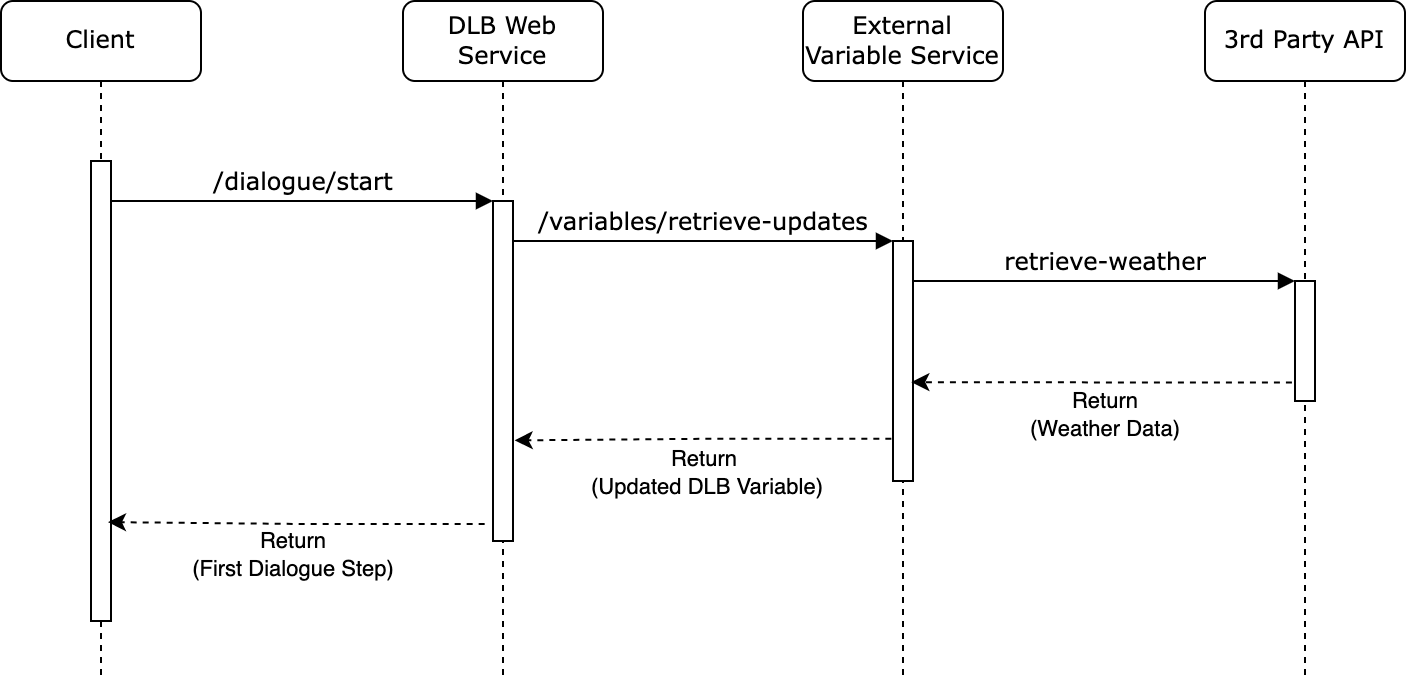
Sequence diagram for the flow of operations between a Client, the Dialogue Branch Web Service, an External Variable Service, and a 3rd Party API
The External Variable Service integration is enabled through the following dlb.external-variable-service.* configuration properties (see apps/api/src/main/resources/application.yml, overridable via DLB_EXTERNAL_VARIABLE_SERVICE_* environment variables):
dlb.external-variable-service.enabled— set totrueto enable the integration;false(the default) disables it entirely.dlb.external-variable-service.url— the base URL where the external variable service can be reached.dlb.external-variable-service.api-version— the API version to use when calling the external variable service.dlb.external-variable-service.oauth2.token-uri— the token end-point where the Web Service gets the access token for its calls, for examplehttps://keycloak.example.com/realms/dialoguebranch/protocol/openid-connect/token.dlb.external-variable-service.oauth2.client-idandclient-secret— the Web Service's own confidential client for these calls (see Authentication).dlb.external-variable-service.oauth2.scope— scopes to request, space-separated (optional).dlb.external-variable-service.connect-timeout— how long a call may take to connect before it fails (default2s).dlb.external-variable-service.read-timeout— how long a call may wait for the response before it fails (default5s).
With the integration enabled, the Web Service does not start unless token-uri, client-id and client-secret are set.
Authentication
Every call the Web Service makes to the External Variable Service carries an OAuth2 access token, as Authorization: Bearer <token>. The Web Service gets it from Keycloak (or another authorization server) with the client-credentials grant, as its own confidential client, and keeps using it until shortly before it expires. If your service answers 401, the Web Service gets a new token for its next call.
Breaking change
Earlier, the Web Service sent one static API key (dlb.external-variable-service.api-key). That setting is gone. To move an existing External Variable Service over, first let it accept the new tokens, if need be next to the old key for a short while, then upgrade the Web Service.
Your External Variable Service must check every token before answering:
- Signature: signed by one of the realm's public keys (for Keycloak,
<realm URL>/protocol/openid-connect/certs). - Issuer and expiry:
issis the realm the Web Service gets its tokens from, and the token has not expired. - Audience: your service's own client id is in
aud, so a token meant for another service is refused. - Role: the token has your service's role, for example
evs-accessinresource_access.<your client id>.roles.
Refuse a request that fails any of these, with 401 (no valid token) or 403 (no role). In Keycloak, set this up as follows:
- A client for your service, for example
dlb-variable-service, with no login flows enabled, and a client roleevs-access. - A confidential client for the Web Service, for example
dlb-web-service-evs, with only Service accounts (client credentials) enabled, an Audience mapper that addsdlb-variable-serviceto the access token, and its service account given the roleevs-accessofdlb-variable-service.
The Docker stack in infrastructure/docker has exactly these two clients in its realm, and apps/mock-variable-service checks tokens this way.
When the External Variable Service fails
The External Variable Service is an outside system that can be slow or down, and the Web Service never lets that break a dialogue. Every call has the timeouts above, and so does getting its token. A call that fails, times out, gets a response other than a success, or for which no token could be got, is logged, and then:
retrieve-updates: the dialogue starts with the values the Web Service already has, as if no updates were needed. A dialogue start therefore waits at most the connect and read timeouts for your service.notify-updated: the change stays in effect in the Web Service; your service misses it. The nextretrieve-updatessends the Web Service's current values along, so your service can catch up there.notify-cleared: the clear, or the erase of a user's data, stays in effect in the Web Service.supported: the only exception. It answers an explicit question, so the Web Service reports the failure to its caller instead of an empty list (see Reporting supported variables).
The Web Service does not retry a failed call.
To see whether your service is running at all, Dialogue Branch Studio shows its state in the status bar at the bottom of the screen ("External Variable Service: connected" or "not reachable"). To find out, the Web Service makes one GET /variables/supported call with its token, at most every 30 seconds. Any answer counts as running, even a 404 or 501 from a service that doesn't implement this optional end-point. A 401 or 403 doesn't, and neither do a refused connection, a timeout or a failed token request. A single failed call for a dialogue doesn't change the state. Admins find the details in Studio's Technical Information: the configured URL, the last successful and failed calls, the last error and the number of failed calls in a row.
Note
It is worthwhile to make sure that the External Variable Service answers the request for variable updates quickly, because any delay will delay the starting of dialogue execution in the Dialogue Branch Web Service - which will negatively impact your end-user's experience. Apply caching, and make use of the updatedTime that is passed along with each Variable (the moment since which the Web Service has held its value), to make quick judgements whether a variable needs to be updated at all.
Answering a request for updates
The Web Service sends retrieve-updates the Variables a dialogue uses, each with its current value and updatedTime: the moment since which the Web Service has held that value, or none if it has no value. Answer with only the Variables that have a new value, each as its name and value:
[
  { "name": "temperatureAtUserLocation", "value": 14 },
  { "name": "lastWorkout", "value": null }
]
A null value removes the Variable. The Web Service stores every update as updated at the moment it receives it, as it does for a value set in a dialogue or through its own end-points, so that is the updatedTime it reports from then on. An updatedTime or updatedTimeZone in your answer is ignored.
Breaking change
Earlier, the Web Service stored the updatedTime your service sent with an update. It now ignores it and records when it received the update.
Request identity
Every call the Web Service makes to the External Variable Service (retrieve-updates, notify-updated, notify-cleared) carries the same query parameters identifying whose variables, in which project, the request concerns:
| Parameter | Description |
|---|---|
subject | The user's stable OIDC sub claim — the identifier your service should key on. |
issuer | The full OIDC issuer URL (iss) the user authenticates through. One Web Service instance may trust several Keycloak realms, so subject is only unique within an issuer; the pair (issuer, subject) is the stable user identity. |
projectSlug | The slug of the Dialogue Branch project the variables belong to. Variables are project-scoped — the same variable name in two projects is two independent values. |
timeZone | The user's current IANA time zone (e.g. Europe/Lisbon). |
A request for updates (retrieve-updates) also carries testSession: true when it comes from a test session, false when it comes from real playback (see Where requests for updates come from).
notify-cleared is also sent when an admin erases a user's data (POST /users/erase-user), once for each project the user had variables in. If your service keeps its own copy of a user's variables, erase it then too.
Breaking change
The earlier single userId parameter (a bare username) has been replaced by subject + issuer + projectSlug. Update your External Variable Service implementation accordingly; there is no API-version bump.
See also Working with Variables on the API Service page, for how Variables are set and retrieved directly through the Web Service's own /variables/* end-points.
Where requests for updates come from
The Web Service sends a request for updates (retrieve-updates) whenever it starts executing a dialogue: one started by a client, or one reached through a reply that links to another dialogue, starting at whichever node the link names. The request asks about every Variable the dialogue uses, and sends along the values the Web Service currently has for them. Such a request does not always follow from a real user's real action.
Besides real playback, dialogues also run in test sessions: ephemeral sessions in which an author tests a dialogue (for example in Dialogue Branch Studio's Authoring Mode), or an administrator simulates a user to investigate a problem, on the dialogues' draft or published content. A test session behaves like real playback, so it sends the same request for updates, for the user whose Variables it runs with: the author themselves, or the user being simulated. The difference is in what happens to the results. A test session runs against its own temporary copy of that user's Variables. The values you return go into that copy, the copy is discarded afterwards, and nothing a test changes is ever sent to you: a test session never sends notify-updated or notify-cleared.
This means that a request for updates tells you that a dialogue is about to run, and which Variables it needs. It does not by itself mean that the user is active, and in a test session the values it sends along are not the user's stored values but those of the session's copy, which the test may have changed. Changes to a user's real Variables reach you only through notify-updated and notify-cleared.
Every request for updates says where it comes from, in its testSession query parameter: true for a test session, false for real playback. If your External Variable Service acts on a request for updates beyond answering it, for example by recording it as user activity, use this parameter to tell the two apart.
Reporting supported variables
A dialogue author has no built-in way to know which $variable names a configured External Variable Service actually understands. Any variable reference is syntactically valid, so a dialogue can reference $stepsToday expecting the EVS to fill it in while the EVS only knows $numberOfStepsToday — a naming mismatch that is otherwise silent, since a variable with no value is never treated as an error by the Web Service.
To make this discoverable, your External Variable Service may implement one additional, optional end-point:
GET /v{version}/variables/supported?projectSlug=<slug>
Same token authentication as
retrieve-updates/notify-updated/notify-cleared(see Authentication).projectSlugis required, not optional. An External Variable Service deployment is typically multi-tenant (one deployment, many projects), and which variables it can actually compute may differ per project — a project without a given data integration enabled should not advertise a variable it can never fill for that project's users. A single-project EVS can simply ignore the parameter and return the same list every time; requiring it costs that implementation nothing.Response: a bare JSON array of objects, each with a required
nameand these optional fields:Field Meaning descriptionA short, human-readable description of what the variable holds. typenumber,stringorboolean. There is no date type: a date is a string, described indescription.valuesThe values the variable may take, for a setting with a fixed set of options. readOnlytrueif your service computes or controls the variable and doesn't accept changes from a dialogue.For example:
json[ { "name": "visits.count", "description": "How often the user has visited", "type": "number", "readOnly": true }, { "name": "settings.theme", "type": "string", "values": ["light", "dark"], "readOnly": false }, { "name": "nickname" } ]type,valuesandreadOnlyare hints for authors. Dialogue Branch Studio shows them, but neither the Web Service nor the core library enforces them, and they don't change how a dialogue runs. Enforcing them is up to your service: if it marks a variable read-only, it should ignore or reject changes to it innotify-updated. A dialogue that sets a read-only variable anyway only changes Dialogue Branch's own copy, until the nextretrieve-updatesat a dialogue start replaces it with your value. The Web Service passes the hints on exactly as you send them: a field you leave out stays absent, and is never filled in with a default.This is a static, EVS-wide-per-project capability list, not a per-user one: it answers "can this EVS compute this variable for this project at all," not "does this specific user have a value right now" (the latter is a legitimate
nullfromretrieve-updates, a different and unrelated kind of gap).
The Web Service exposes this to clients like Dialogue Branch Studio via GET /variables/list-supported?projectSlug=<slug> (see Working with Variables), proxying each call to the EVS live, with no caching. This call is not on the dialogue-execution hot path the way retrieve-updates is, so there is no latency pressure to justify storing a second, potentially stale copy of the EVS's own answer — if your EVS is unreachable, the Web Service reports that directly rather than returning a cached or empty list that could be mistaken for "supports nothing."
An External Variable Service that does not implement /variables/supported is not an error: the Web Service treats a missing or unimplemented end-point as "capability unknown." This is purely a discovery mechanism — the Web Service does not validate dialogue content against it, warn about unsupported variables, or otherwise change execution behavior based on it.
Note
If you found errors or have questions about this page, please consider reporting an issue at https://github.com/dialoguebranch/platform or sending an email to info@dialoguebranch.com.