Dialogue Branch Projects
A single .dlb script might be all you need for your Dialogue Branch Powered application. But once the content offered by your virtual agents is expanding, it becomes important to split your work into several scripts. Additionally, you might want to make your dialogue content available to users that speak different languages, so you will need "translation files" (.json files) to accompany your dialogues.
Defining a "Dialogue Branch Project" is the way to organize your various Dialogue Branch scripts and various translation files into a single manageable collection.
Basic Dialogue Branch Project
The most basic version of a Dialogue Branch project is a (root) folder that contains a dlb-project.xml metadata file, alongside one sub-folder per supported language. Each language folder contains the .dlb scripts (for the source language) or .json translation files (for translation languages) for that language; arbitrary further sub-folder structures may be used within a language folder to organize your set of .dlb and .json files — any .dlb/.json file found anywhere below a language folder is picked up automatically.
my-project/
  dlb-project.xml
  en/                 <- source language folder (code "en" matches <source-language code="en"/>)
    basic.dlb
    menu.dlb
    quests/
      dragon-quest.dlb
  nl-NL/               <- translation language folder, holds .json translations, not .dlb
    basic.json
    menu.json
    quests/
      dragon-quest.json
Translation Files
A translation file (.json) holds the translations of one dialogue in one translation language, and has the same path below its language folder as the dialogue's .dlb script below the source language folder (nl-NL/quests/dragon-quest.json translates en/quests/dragon-quest.dlb).
It is a JSON object of speaker groups. Each key is the name of a speaker, exactly as it appears in the speaker tag of the dialogue's nodes, spaces included; the group _user holds the translations of the user's replies. Inside a group, each key is a text of that speaker in the source language, and its value is the translation:
{
    "Martin McOwl": {
        "Hello, how are you?": "Hallo, hoe gaat het?"
    },
    "_user": {
        "I'm fine, thanks.": "Goed, dank je."
    }
}
A translation only applies to text of its own speaker: the same text spoken by two speakers can have two different translations, and a text whose speaker has no entry for it stays in the source language. An entry outside a speaker group is an error.
Inside a speaker group, a nested group can narrow a translation down by gender, for languages where a text changes with the gender of the speaker or of the one addressed. Its key is one or more of male_speaker, female_speaker, male_addressee, female_addressee, male_user and female_user, separated by spaces, and groups can be nested further. Among the entries of a speaker, the first one whose contexts fit the genders in the conversation is used; an entry without gender contexts always fits.
Translation treats each node as an exchange between two parties, its speaker and the end user, because a script doesn't say to whom a text is addressed:
*_speakeris the one saying the text: the node's speaker for its statements, the user for the user's replies (in the_usergroup).*_addresseeis the other party: the user for a node's statements, the node's speaker for the user's replies.*_useris the end user wherever they are in the text, also when they are only talked about, for example when an agent tells another agent "You look much better than $userName."
A speaker's gender is the one in the project's Speakers; the end user's is the variable $dlb.userGender, read at every step. Only the user's gender varies while a dialogue runs; an agent's gender is fixed, so a text about a particular agent can simply be translated for that agent's gender. When a gender is undefined (or the speaker isn't one of the project's speakers, or $dlb.userGender is empty), only entries without a context for that role fit, so a gender-neutral translation is used where there is one; without one, the speaker's first entry is.
Where the source text itself changes with the user's gender ("Look at him go!"), branch on $dlb.userGender in the script instead; each branch is translated on its own.
{
    "Martin McOwl": {
        "female_addressee": {
            "You look tired.": "Je ziet er moe uit, meid."
        },
        "You look tired.": "Je ziet er moe uit."
    }
}
Concepts in a Dialogue Branch Project
Without going into the question of how to store this information, we first describe all the conceptual parts of a Dialogue Branch Project.
Basic Metadata
A Dialogue Branch Project should define the following basic metadata elements:
- Name — A Dialogue Branch Project has a name, which can be any string. This is the only required piece of metadata.
- Version — A Dialogue Branch Project has a free-form version indicator (e.g.
v0.1.0), which can be any string. Optional, defaults to an empty string. - Description — A Dialogue Branch Project has a description, which can be any string of any length.
Note
When a project is stored in the Web Service's database rather than as files, its name is limited to 255 characters, to ensure compatibility between Dialogue Branch Projects that are stored as files vs Dialogue Branch Projects stored in a relational database. This limit does not apply to the version or description, nor to any of these fields when working with project files directly.
Note
When a project is authored through Dialogue Branch Studio's visual editor (see Dialogue Branch Web Services), it is additionally identified by a projectSlug — a short, URL-safe identifier used throughout the Web Service API to select which project a call applies to. This is the same identifier as the slug attribute described below; the Web Service assigns it when the project is created, and writes it back into the exported dlb-project.xml file's root element.
Language Map Metadata
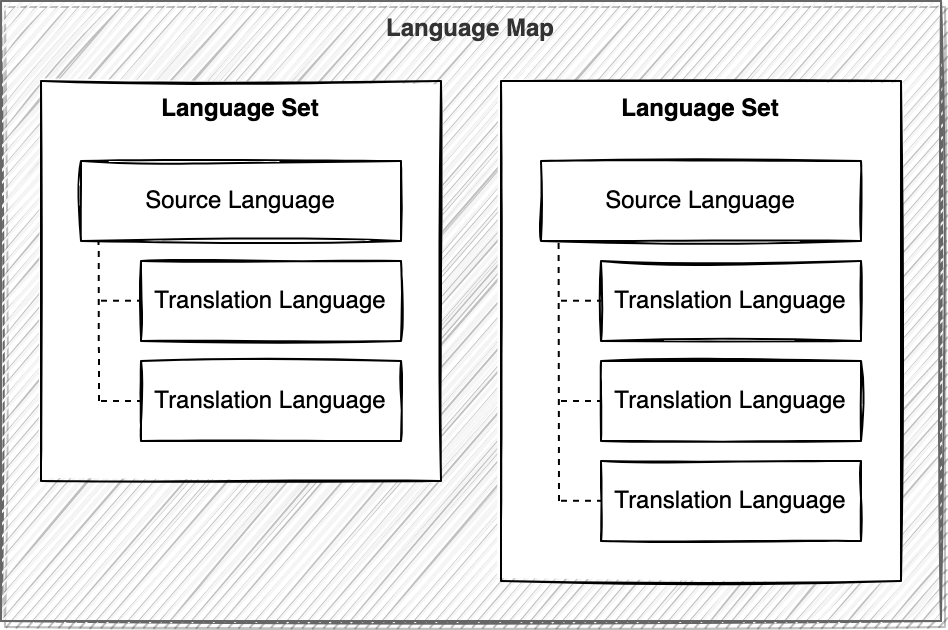
A Dialogue Branch Project should define the set of languages for which content is available by declaring a Language Map.
A Language Map consists of exactly one Source Language, and 0 or more Translation Languages.
Both a Source Language and a Translation Language are defined by a name and a code.
Speakers
A Dialogue Branch Project can define the Speakers its dialogues use: the names a node's speaker tag can have. Defining them is optional; a project without speakers works as it always has, and any name can be used as a node's speaker.
A Speaker has:
- a name, exactly as it appears in a node's
speakertag, spaces included. It can't be empty, can't start or end with spaces, and can't be_user, which is reserved for the user's replies. No two speakers have the same name. - a gender:
male,femaleorundefined(the default when left out). Translations into languages where a text changes with the speaker's gender use it. - whether it is the default speaker: at most one speaker is. It only helps editors, who give it to a new node; it means nothing when a dialogue runs.
Dialogue Branch Project Metadata file
A Dialogue Branch Project's metadata is stored in a dlb-project.xml file at the root of the project. The root element is dlb-project, with a required name attribute and optional version and slug attributes. slug (shown below) is normally only populated by the Web Service, when it writes out a project's metadata as part of its Export Project feature — see the Note on projectSlug above; when hand-authoring a project file yourself, you can safely omit it:
<?xml version="1.0" encoding="UTF-8"?>
<dlb-project name="My Dialogue Branch Project" version="1" slug="my-dialogue-branch-project">
  <description>A short description of this project.

  Descriptions may span multiple lines.</description>
  <language-map>
    <source-language name="English" code="en" />
    <translation-language name="Dutch (Netherlands)" code="nl-NL" />
    <translation-language name="Portuguese (Portugal)" code="pt-PT" />
  </language-map>
  <speakers>
    <speaker name="Martin McOwl" gender="male" default="true" />
    <speaker name="Anna" gender="female" />
    <speaker name="Narrator" />
  </speakers>
</dlb-project>
The code attribute of each <source-language>/<translation-language> element must match the name of its corresponding language folder at the project root (e.g. code="en" corresponds to the en/ folder shown above).
The <speakers> element is optional. Each <speaker> has a required name, an optional gender (male, female or undefined, the default) and an optional default (true or false, the default), following the rules under Speakers. A project whose speakers break one of those rules doesn't load.